 By Chris Liversidge ·
2nd September, 2025
· Performance Marketing
By Chris Liversidge ·
2nd September, 2025
· Performance Marketing


There has been a lot written about the impact of AI overviews and AI Mode on search results – not least by myself when analysing the changing landscape for marketing measurement in 2025.
What is becoming clear is that there has not been a sudden overall decline in search volume – essentially because searcher volumes have been propped up by overall increased volumes of searches. Within that overall increase however, what we have seen is click behaviour change significantly.
I discussed this in detail for our customers three months ago, and have now published that advice for everyone here: AI Mode & The Future of Search.
The data we have access to indicated that today you need to find the longer tail terms that are delivering clicks after the searcher has encountered an AI Overview. Today I’d like to talk about an analysis technique that we use here at QueryClick to understand where those clicks are coming from and how they track across paid and organic search sources: Halo Analysis.
For this particular analysis, we are exclusively using Google data – and so you can replicate this for any site that has Google Ads and Google Search console data available.
Halo Analysis: The Paid & Organic Click Landscape
Our objective with Halo analysis is to:
- Understand the click behaviours in Paid & Organic and if we are cannibalising ourselves anywhere
- Identify the gaps where we have paid but no organic and vice-versa – as these represent terms which have evidenced conversion behaviour and so are highly likely to be relevant.
To collect this data it is necessary to use the APIs for Search Console in particular, as data exports from the interface are extremely limited. The latest API however allows us to stream data and paginate our requests. This means you can go from just 1,000 results for a given segment, to literally every single data row held by Google even if there was just one impression for the search term.
Gold dust for SEOs looking to maximise CTRs and positive traffic behaviour!
As a side note: for those who question the value of optimising for SERP CTR, after the latest Google algorithm leak we had confirmation that Google does indeed use SERP CTR as an important measure of searcher behaviour used by the algorithm to drive the ranking position of a result.
So if you have poor searcher click behaviour, then regardless of how well you have developed your domain authority, you will struggle to rank in any of the top positions that actually drive traffic. So, back to our APIs.
Google Ads API & Choosing Granularity
For many of us, working with Google Ads is often about choosing just how detailed we want to be. When building a Halo report, we need to think about what end state we want to achieve. Previously in Halo reports I have personally built we used to be able to access and calculate the specific ranking position of Paid Search Ads. Which, a decade ago, allowed building dashboards like these:
Today, we are not able to gather exact position for Paid Ads thanks to Google closing off that data source, so we need to take a different approach and instead consider Impression Share and Absolute Impression Share instead as a proxy for position.
This means if we have a benchmark of expected CTRs, from which we can derive expected organic positions, we can understand if we have a negative click behaviour anywhere independently from paid positions.
But implied in assessing click behaviour are two segmentations: device & brand.
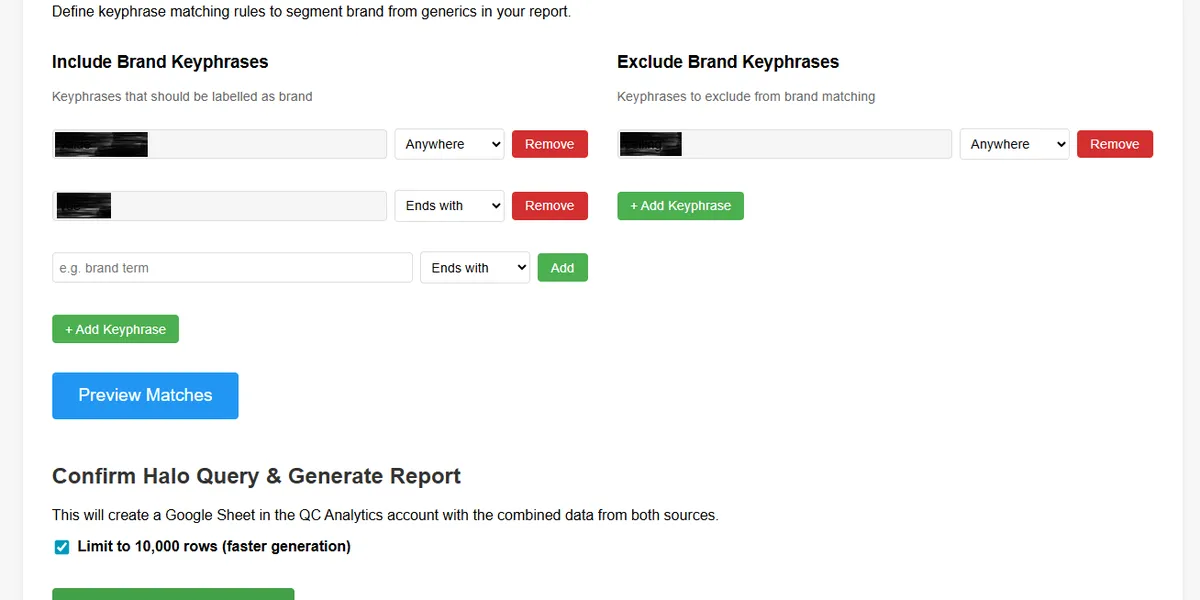
Device obviously has a major impact due to the major differences in layout between – for example – mobile and desktop layouts. Brand is an often missed out segmentation, as searcher behaviour is dramatically different when a searcher uses a brand term – they are likely further on in their search journey, and therefore will behave differently in their click and subsequent conversion behaviour as they have moved from Consideration to Conversion in their overall behaviour.
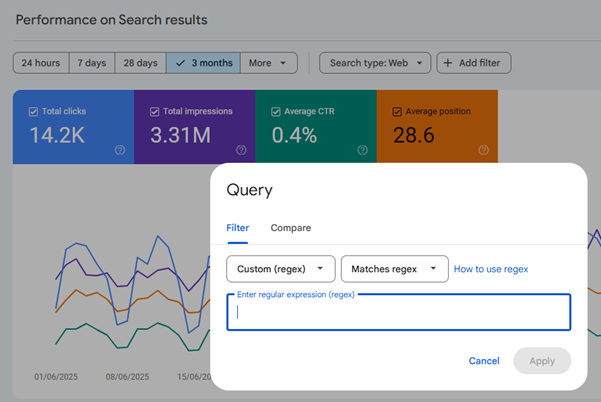
In a manual export we can easily segment by brand for Search Console using REGEX, and depending on your Campaign structure, we could also be selective about which Campaigns we search against, but because we will be using the API we can be more robust when designing our new Halo report.
The latest release of the Google Ads API, allows us to interrogate for keywords by campaign – essentially replicating a Search Query Report (SQR) – which is certainly an option.
However, if we want to get really granular, ideally we would also bring landing page data to the table to backfill the missing link in keyphrase position from Ads. After all, if we can assess the individual Ad Group, we can collect the keyphrases triggered, the landing pages, and we would have an ability to take action directly into the ad at Ad Group level.
And we can also take advantage of streaming for Ad Groups to allow us to similarly export every single result where there is even a single impression triggering an ad.
Building our Query & Creating Brand Filtering
In the end, we likely need an interface to cater for Brand filtering, as in my experience for a tool that anyone can use, requiring REGEX is often too much to ask – even when AI tools can help with creating a match for given strings – as often we have edge cases when terms are included that shouldn’t be or vice-versa.
And of course, building brand filtering means you will need a profile to store it against, so we sill need to create a profiling and storage for our app, against which we can save our brand configuration, and associate our account selections for each domain we wish to interrogate.
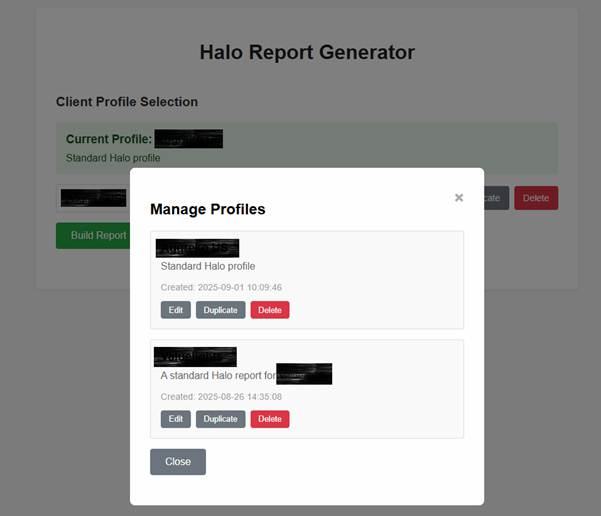
Here is a simple interface using Swagger UI – though any UI that gets you up and running quickly is viable, for example Bootstrap UI is also popular.
Now we have a profile object, we can build connectors to authenticate with our data sources and include selectors to allow the user to choose the Google Ads account and Search Console Property they would like to use to cross-compare SERP results in a Halo report.
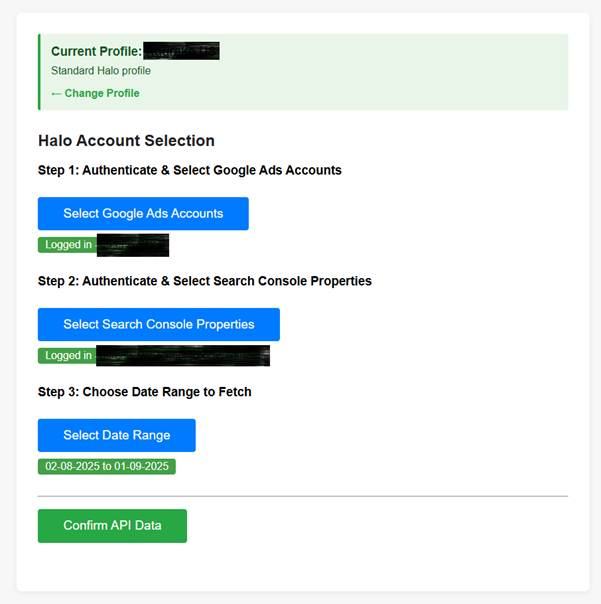
As you can see, I have also added alerts for authentication status, to encourage re-authentication. API requests have different authentication periods in Search Console and Google Ads, and are also dependant on authentication rights.
Selecting a date range early, means we can check the authentication data before building our final Halo report and sending it to our choice of visualisation tool.
Then we confirm our data is being collected correctly, for that I create my API calls – looking at the Google Ads’ Ad Group data segmentation to get the full granularity of Ad, term, device, and landing page so I can stitch across to the Search Console data using a foreign key.
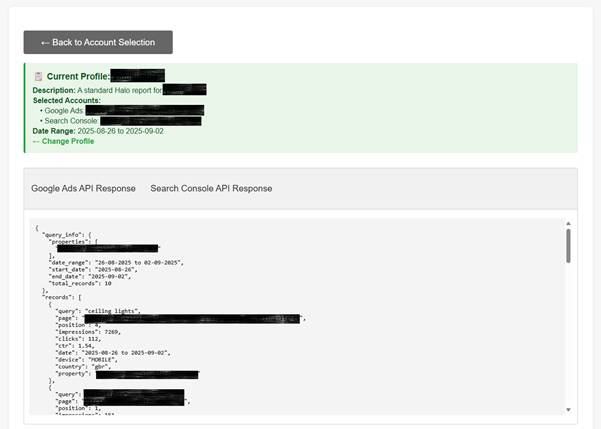
Here we summarise back what we think we are seeing, and trim our initial API results calls back to the top 10 results so we can eyeball and check we are looking at correct data, and that we have chosen the right paid media accounts – often finding the correct domain in a packed MCC can be challenging!
Next, lets create a user-friendly front end that replaces the need for REGEX matching to filter for Brand and Generic.
In my experience, the best approach is to build up patterns to match and build a ‘Brand’ list, and then allow application of Exclusion patterns that will remove a Brand label that runs after the Include matching is complete.
This logical approach allows for exclusion of edge case generic terms. I also include ‘Start’, ‘Anywhere’, and ‘End’ matching to essentially replicate the most useful aspect of REGEX to match to all possible strings with the fewest possible rules. I typically find 4-5 rules applied in this way with intelligent selection of string value lets us match to almost any brand variation in keyphrase terms we so choose.
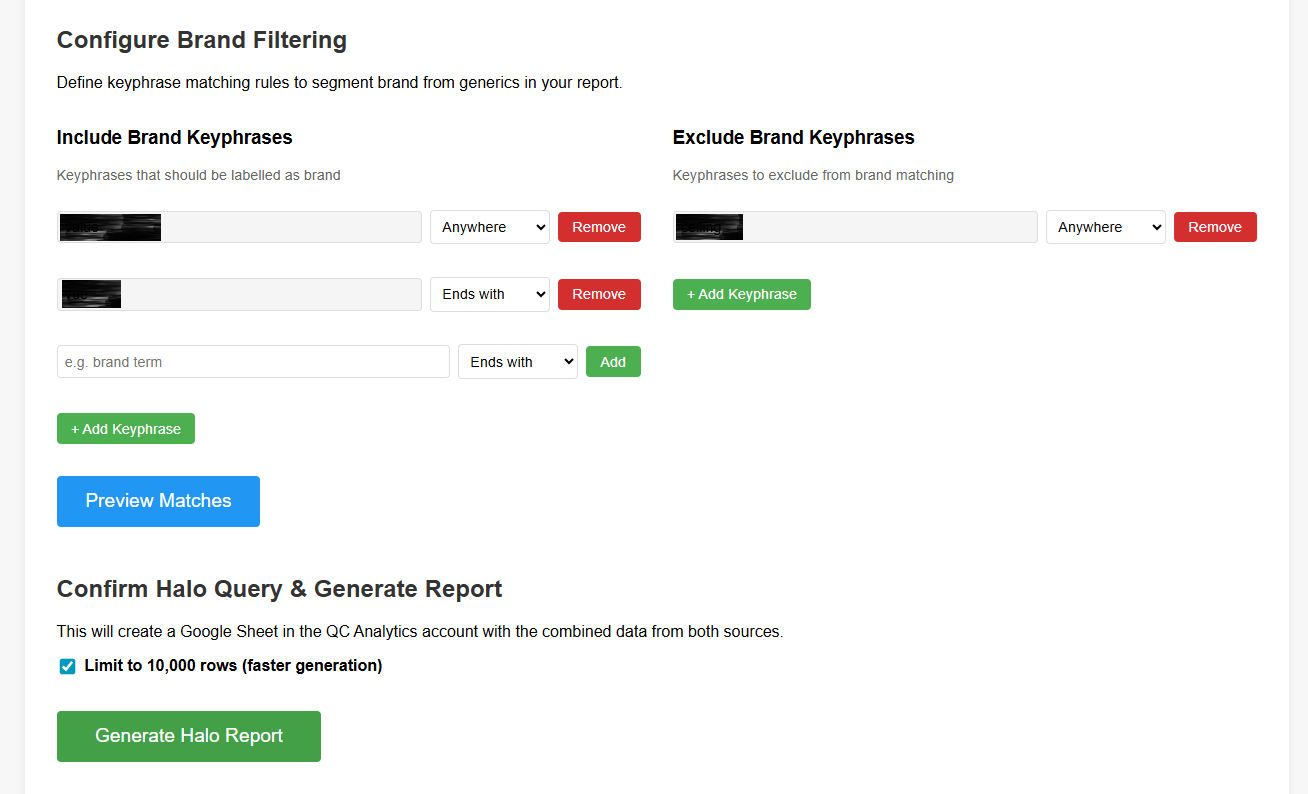
For extra ease of building the brand terms, I also built a quick function to build the first 100 or so results sorted by clicks to find matches and then apply the ruleset and flag each term for manual review and discovery of any common edge cases.
Once that is all configured, I then apply a minimum criteria to the query used to build the report depending on how large the dataset is likely to be. For most clients here at QC, we have very large data volumes and so I limit to only results with a minimum of one click on each side – i.e. Search Console and Google Ads results.
For the particular example report we will look at, this cut back the results rows from 450k results back to a more manageable 150k or so.
Finally, we need to not just pull results from Google Ads and Search Console – but also merge them, and this is where we introduce the idea of a foreign key.
Matching Across Paid & Organic with a Foreign Key
Designing our API query requires us to anticipate what we need to join uniquely across. Here we have a critical use case: We want to understand what our click behaviour is for tow channels that can conflict or cannibalise. Therefore we have to join across keyphrase, we also have to join across device, and we need to consider that the behaviour may be quite different for brand Vs non-brand – and so this should be the basis of our foreign key.
Functionally for our query, this can be a simple as ensuring standard lowercasing, ensuring we trim any unnecessary blank spaces at the start or end of a strong, and then joining in a key like so:
- keyphrase-device-channel
We then apply band filtering to the joined dataset and we pull only the relevant API columns for our analysis. For Google Ads, that would be:
- Query
- Paid impression Share
- Paid Absolute Impression Share
- Paid CTR
- Paid Impressions
- Paid Clicks
- Paid Cost
- Campaign ID
- Campaign Name
- Ad Group ID
- Ad Group Name
- Landing Page
- Device
And we add Brand after we have applied the stitching. For Google Search Console, we collect:
- Query
- Landing Page
- Impressions
- Clicks
- CTR
- Position
- Device
Then to simplify our final Halo report, we combine the two data sets without destroying data, and so use on OUTER LEFT style join, integrating the two Query columns into one, then add the Brand labelling.
Finally, we sort by impressions, descending and we then decide on how we want to present our data for easiest data insight discovery. For this report, as it’s used by analysts at QueryClick, the easiest way to allow the data to be integrated into wider customer reporting is to use Looker Studio, and so we can also use its API to insert our data and go the extra mile by applying formatting and inserting the data into a table.
Due to the size of our datasets, we should again take advantage of data streaming and use batch insertion to build out our table in blocks of manageable data so we don’t have our API connection cut short.
The Halo Report: Unified Search Behaviour Insight
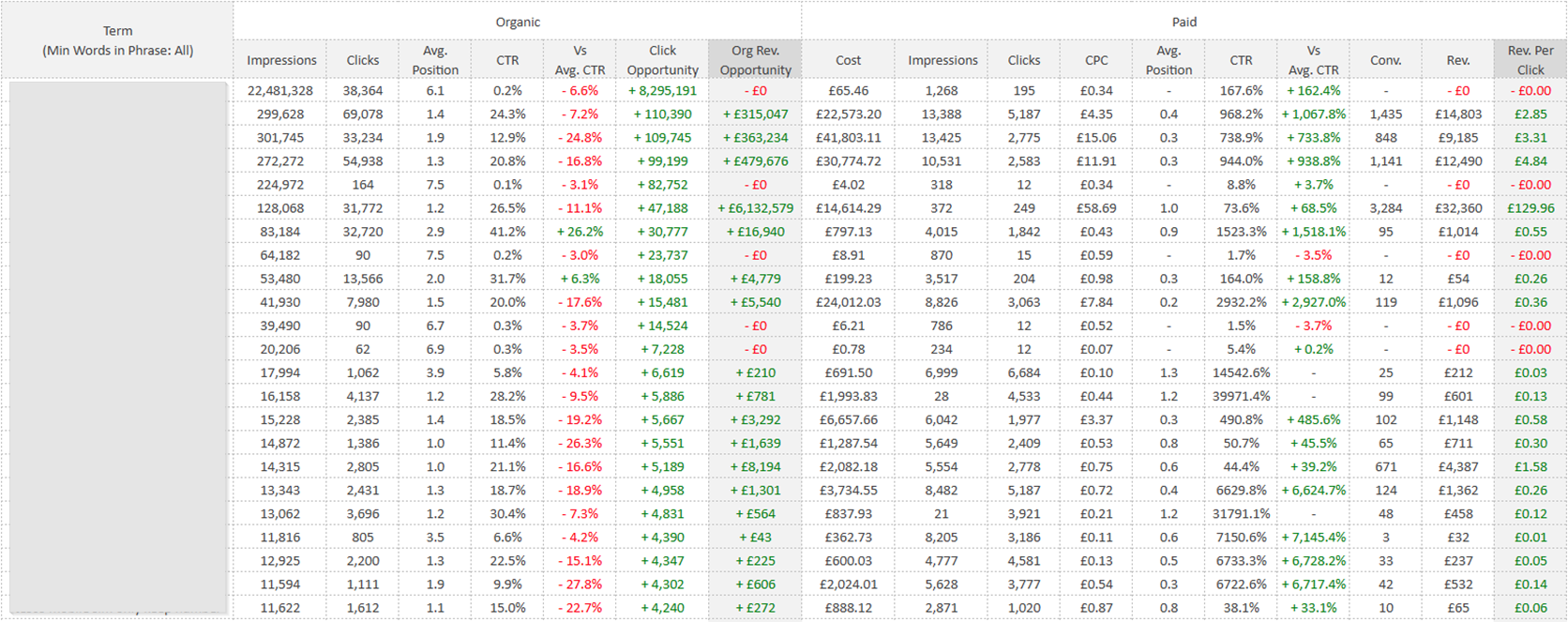
And so, here we have our final report, ready for slicing and dicing in Google Sheets.
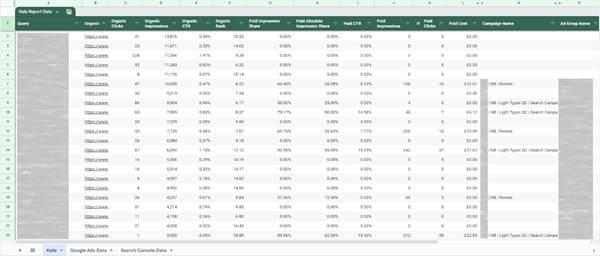
Using Sheets means we can drill into brand only results, by device to find negatives we need to apply where we hold the top rankings and don’t require a high Absolute Impression share:
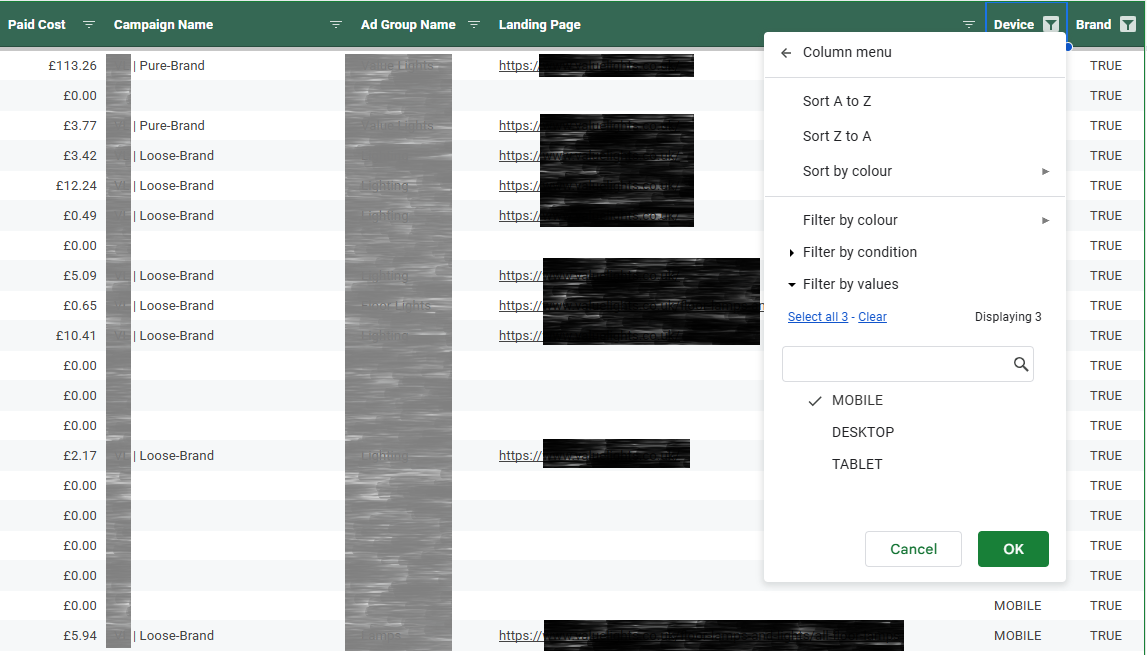
Or look for the – in this example – major opportunities for increased spending on high CTR terms that are already performing organically – and use the correct landing page when building out our campaign.
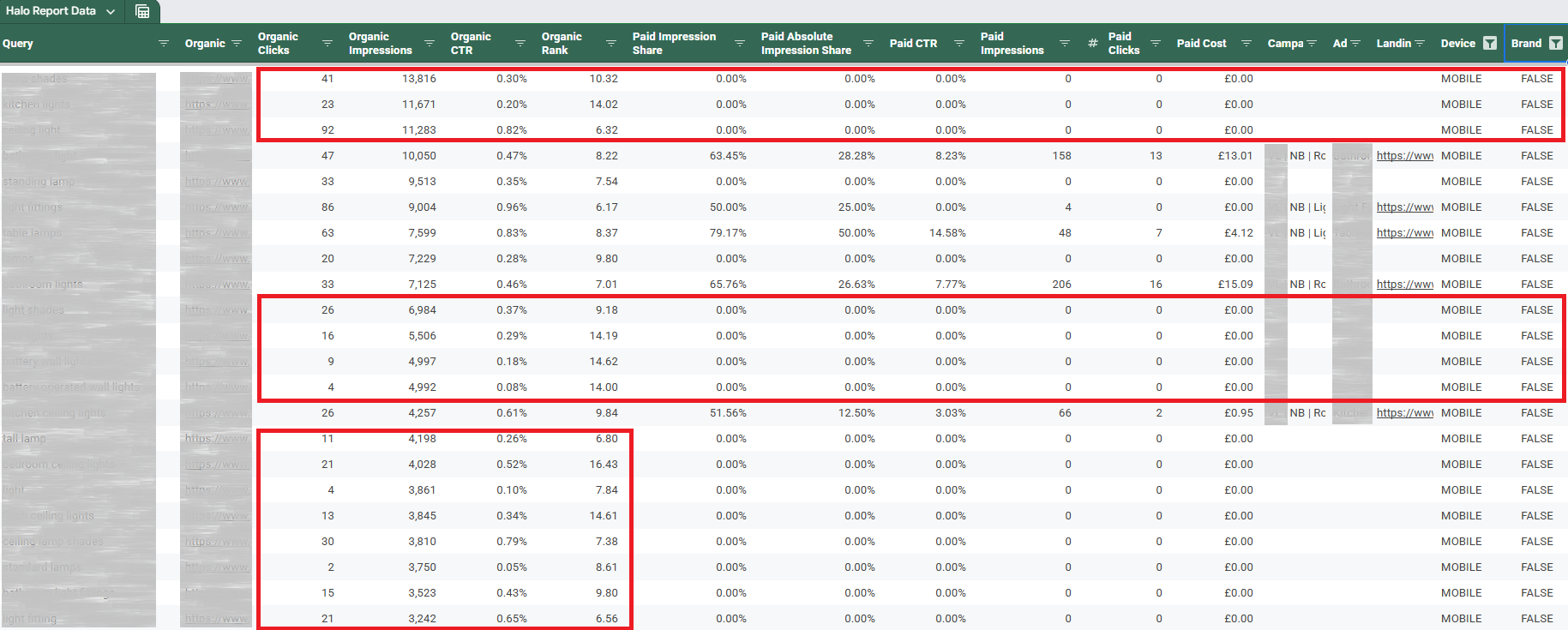
In this example, I have pulled the terms that are outside the top three positions, which have the highest volume of organic clicks, and which have little Paid Search visibility currently.
These terms will likely perform very well when targeted in a Paid Ad, as they are provably relevant based on click behaviour. And as a bonus, I already have landing pages eligible to land on neatly listed for me to incorporate into my paid strategy.
Inverting this filtering, to look at only the terms with the top organic impressions means I can identify the brand terms we wish to bid less aggressively on where I see a high Top Absolute Impression share.
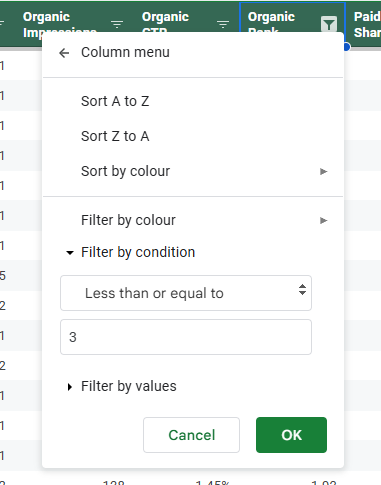
And so there you have it – a walkthrough on rolling your own Halo report, considerations on how to manage user workflow common to any agency or in-house, and the most obvious use cases called out to make you even more effective as a search marketer.
Here’s to automated Halo insights!
If you would like our team to help build and optimise your Organic search performance, just drop us a line today.
Client Experience


Author

